Titanium.UI.EmailDialog
An email dialog is a modal window that allows users to compose and send an email.
| Android | iOS |
|---|---|
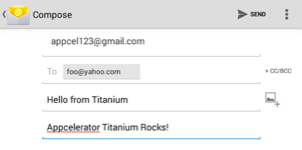 | 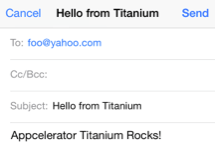 |
The Email Dialog is created with the Titanium.UI.createEmailDialog method. The user needs to register an e-mail account on the device in order to open the dialog. The dialog will not open when there is not a registered e-mail account.
iOS Platform Notes
On iOS, you cannot test the e-mail dialog on the iOS Simulator. Test the email dialog on device.
Extends: Titanium.UI.View · Since: 0.8
Properties #
accessibilityDisableLongPress#
Type: Boolean
Boolean value to remove the long press notification for the device's accessibility service.
Will disable the "double tap and hold for long press" message when selecting an item.
apiName#
Type: String
The name of the API that this proxy corresponds to.
The value of this property is the fully qualified name of the API. For example, Button
returns Ti.UI.Button.
barColor#
Type: String, Titanium.UI.Color
Bar color of the email dialog window, as a color name or hex triplet.
For information about color values, see the "Colors" section of Titanium.UI.
bccRecipients#
Type: Array<String>
Recipients of the email included via the BCC (Blind Carbon Copy) field.
bubbleParent#
Type: Boolean
Indicates if the proxy will bubble an event to its parent.
Some proxies (most commonly views) have a relationship to other proxies, often
established by the add() method. For example, for a button added to a window, a
click event on the button would bubble up to the window. Other common parents are
table sections to their rows, table views to their sections, and scrollable views
to their views. Set this property to false to disable the bubbling to the proxy's parent.
CANCELLED#
Type: Number
Constant for the CANCELLED status result. On Android, this property exists but is not used.
elevation#
Type: Number
Base elevation of the view relative to its parent in pixels.
The elevation of a view determines the appearance of its shadow.
Higher elevations produce larger and softer shadows.
Note: The elevation property only works on Titanium.UI.View objects.
Many Android components have a default elevation that cannot be modified.
For more information, see
Google design guidelines: Elevation and shadows.
filterTouchesWhenObscured#
Type: Boolean
Discards touch related events if another app's system overlay covers the view.
This is a security feature to protect an app from "tapjacking", where a malicious app can use a
system overlay to intercept touch events in your app or to trick the end-user to tap on UI
in your app intended for the overlay.
Setting this property to true causes touch related events (including "click") to not be fired
if a system overlay overlaps the view.
hiddenBehavior#
Type: Number
Sets the behavior when hiding an object to release or keep the free space
If setting hiddenBehavior to Titanium.UI.HIDDEN_BEHAVIOR_GONE it will automatically release the space the view occupied.
For example: in a vertical layout the views below the object will move up when you hide
an object with hiddenBehavior:Titanium.UI.HIDDEN_BEHAVIOR_GONE.
- Titanium.UI.HIDDEN_BEHAVIOR_INVISIBLE. Keeps the space and just hides the object (default).
- Titanium.UI.HIDDEN_BEHAVIOR_GONE. Releases the space and hides the object.
Defaults to Titanium.UI.HIDDEN_BEHAVIOR_INVISIBLE.
horizontalMotionEffect#
Type: MinMaxOptions
Adds a horizontal parallax effect to the view
Note that the parallax effect only happens by tilting the device so results can not be seen on Simulator.
To clear all motion effects, use the Titanium.UI.clearMotionEffects method.
html#
Type: Boolean
Determines whether the email message, specifically the contents of
messageBody, should be sent as HTML content type
rather than plain text.
id#
Type: String
View's identifier.
The id property of the Ti.UI.View represents the view's identifier. The identifier string does
not have to be unique. You can use this property with Titanium.UI.View.getViewById method.
keepHardwareMode#
Type: Boolean
A value indicating the render mode of the View
Set to true to keep hardware mode when using a border and transparent backgrounds.
lifecycleContainer#
Type: Titanium.UI.Window, Titanium.UI.TabGroup
The Window or TabGroup whose Activity lifecycle should be triggered on the proxy.
If this property is set to a Window or TabGroup, then the corresponding Activity lifecycle event callbacks
will also be called on the proxy. Proxies that require the activity lifecycle will need this property set
to the appropriate containing Window or TabGroup.
previewContext#
Type: Titanium.UI.iOS.PreviewContext
The preview context used in the 3D-Touch feature "Peek and Pop".
Preview context to present the "Peek and Pop" of a view. Use an configured instance
of Titanium.UI.iOS.PreviewContext here.
Note: This property can only be used on devices running iOS 9 or later and supporting 3D-Touch.
It is ignored on older devices and can manually be checked using Titanium.UI.iOS.forceTouchSupported.
rotation#
Type: Number
Clockwise 2D rotation of the view in degrees.
Translation values are applied to the static post layout value.
rotationX#
Type: Number
Clockwise rotation of the view in degrees (x-axis).
Translation values are applied to the static post layout value.
rotationY#
Type: Number
Clockwise rotation of the view in degrees (y-axis).
Translation values are applied to the static post layout value.
SAVED#
Type: Number
Constant for the SAVED status result. On Android, this property exists but is not used.
scaleX#
Type: Number
Scaling of the view in x-axis in pixels.
Translation values are applied to the static post layout value.
scaleY#
Type: Number
Scaling of the view in y-axis in pixels.
Translation values are applied to the static post layout value.
tooltip#
Type: String
The default text to display in the control's tooltip.
Assigning a value to this property causes the tool tip to be displayed for the view.
Setting the property to null cancels the display of the tool tip for the view.
Note: This property is only used for apps targeting macOS Catalyst.
touchFeedback#
Type: Boolean
A material design visual construct that provides an instantaneous visual confirmation of touch point.
Touch feedback is only applied to a view's background. It is never applied to the view's foreground content
such as a Titanium.UI.ImageView's image.
For Titanium versions older than 9.1.0, touch feedback only works if you set the
Titanium.UI.View.backgroundColor property to a non-transparent color.
touchFeedbackColor#
Type: String
Optional touch feedback ripple color. This has no effect unless touchFeedback is true.
Defaults to provided theme color.
transitionName#
Type: String
A name to identify this view in activity transition.
Name should be unique in the View hierarchy.
translationX#
Type: Number
Horizontal location of the view relative to its left position in pixels.
Translation values are applied to the static post layout value.
translationY#
Type: Number
Vertical location of the view relative to its top position in pixels.
Translation values are applied to the static post layout value.
translationZ#
Type: Number
Depth of the view relative to its elevation in pixels.
Translation values are applied to the static post layout value.
verticalMotionEffect#
Type: MinMaxOptions
Adds a vertical parallax effect to the view
Note that the parallax effect only happens by tilting the device so results can not be seen on Simulator.
To clear all motion effects, use the Titanium.UI.clearMotionEffects method.
Methods #
addAttachment #
Adds an attachment.
On Android, multiple attachments may be added, but will only work if the user chooses to
send via the Android Gmail or K9 mail clients.
The Android "Mail" app, which is only available on some handsets, will only accept one
attachment from a Titanium app.
| Name | Type | Summary | Optional |
|---|---|---|---|
attachment | Titanium.Blob, Titanium.Filesystem.File | Attachment to include in the email. | No |
addEventListener #
Adds the specified callback as an event listener for the named event.
| Name | Type | Summary | Optional |
|---|---|---|---|
name | String | Name of the event. | No |
callback | Callback<Titanium.Event> | Callback function to invoke when the event is fired. | No |
applyProperties #
Applies the properties to the proxy.
Properties are supplied as a dictionary. Each key-value pair in the object is applied to the proxy such that
myproxy[key] = value.
| Name | Type | Summary | Optional |
|---|---|---|---|
props | Dictionary | A dictionary of properties to apply. | No |
clearMotionEffects #
Removes all previously added motion effects.
Use this method together with Titanium.UI.horizontalMotionEffect and Titanium.UI.verticalMotionEffect.
fireEvent #
Fires a synthesized event to any registered listeners.
| Name | Type | Summary | Optional |
|---|---|---|---|
name | String | Name of the event. | No |
event | Dictionary | A dictionary of keys and values to add to the Titanium.Event object sent to the listeners. | Yes |
getViewById #
Returns the matching view of a given view ID.
| Name | Type | Summary | Optional |
|---|---|---|---|
id | String | The ID of the view that should be returned. Use the id property in your views toenable it for indexing in this method. | No |
Returns: Titanium.UI.View
hide #
Hides this view.
| Name | Type | Summary | Optional |
|---|---|---|---|
options | AnimatedOptions | Animation options for Android only. Since SDK 5.1.0 and used only on Android 5.0+ Determines whether to enable a circular reveal animation. Note that the default here is equivalent to passing in { animated: false } | Yes |
insertAt #
Inserts a view at the specified position in the children array.
Useful if the layout property is set to horizontal or vertical.
| Name | Type | Summary | Optional |
|---|---|---|---|
params | ViewPositionOptions | Pass an object that specifies the view to insert and optionally at which position (defaults to end) | No |
isSupported #
Indicates whether sending email is supported by the system.
On iOS 10, the user is able to uninstall the built-in applications including Mail. Because
of that, you should ensure to check if the email dialog is supported on the current device.
Returns: Boolean
open #
Opens this email dialog.
| Name | Type | Summary | Optional |
|---|---|---|---|
options | AnimatedOptions | Supported on iOS only. Simple object to override animation. Note that the default here is equivalent to passing in { animated: true } (while typically the default for <AnimatedOptions> is false) | Yes |
removeEventListener #
Removes the specified callback as an event listener for the named event.
Multiple listeners can be registered for the same event, so the
callback parameter is used to determine which listener to remove.
When adding a listener, you must save a reference to the callback function
in order to remove the listener later:
var listener = function() { Ti.API.info("Event listener called."); }
window.addEventListener('click', listener);
To remove the listener, pass in a reference to the callback function:
window.removeEventListener('click', listener);
| Name | Type | Summary | Optional |
|---|---|---|---|
name | String | Name of the event. | No |
callback | Callback<Titanium.Event> | Callback function to remove. Must be the same function passed to addEventListener. | No |
replaceAt #
Replaces a view at the specified position in the children array.
Useful if the layout property is set to horizontal or vertical.
| Name | Type | Summary | Optional |
|---|---|---|---|
params | ViewPositionOptions | Pass an object with the view to insert and the position of the view to replace. In this case the position property is required. | No |
show #
Makes this view visible.
| Name | Type | Summary | Optional |
|---|---|---|---|
options | AnimatedOptions | Animation options for Android only. Since SDK 5.1.0 and only used on Android 5.0+ Determines whether to enable a circular reveal animation. Note that the default here is equivalent to passing in { animated: false } | Yes |
Events #
complete #
Fired when this email dialog has completed sending an email.
| Name | Type | Summary |
|---|---|---|
success | Boolean | Indicates if the email was handled successfully. Returns true if request succeeded, false otherwise. Note that emails beingdeleted or saved for later do count as success. |
error | String | Error message, if any returned. Will be undefined if success is true. |
code | Number | Error code. Error code will be 0 if success is true, nonzero otherwise. If the errorwas generated by the operating system, that system's error value is used. Otherwise, this value will be -1. |
result | Number | Status of the email send process. The SAVED and CANCELLED constants are iOS only.On Android, this property will return SENT when the user discards or savesa message. |
rotate #
Fired when the device detects a two finger rotation.
This event is fired when doing a two finger rotation and returning the angle.
The event occurs continuously until a finger is lifted again.
| Name | Type | Summary |
|---|---|---|
rotate | Number | Rotation in degrees. |
Examples #
Simple Email Dialog with Attachment
Create and send an email with a file attachment.
var emailDialog = Ti.UI.createEmailDialog()
emailDialog.subject = "Hello from Titanium";
emailDialog.toRecipients = ['foo@yahoo.com'];
emailDialog.messageBody = '<b>Titanium SDK Rocks!</b>';
var f = Ti.Filesystem.getFile('cricket.wav');
emailDialog.addAttachment(f);
emailDialog.open();